Guest Machine Networking with CAPEV2
After some more experimenting and a few days of work I found a solution for capturing network traffic from the CAPE guest machine. It is essentially connecting the two computers together again and providing internet using the router. Below is also an updated network diagram.
- Connect the guest machine again to the managed switch on port X with a new NIC.
- Setup a VLAN for port X, Y, and Z to isolate the traffic.
- Enable port mirroring on port X and have that traffic mirrored to port Z.
- Connect port Z to the CAPE host with another NIC.
- Edit the Auxiliary conf to have tcpdump point to the new NIC on the host machine.
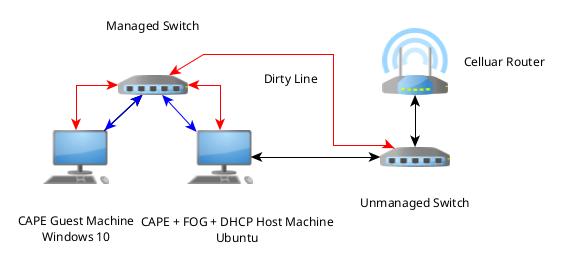
| Color | VLAN | Description |
|---|---|---|
| Blue | 1 | CAPE data |
| Red | 2 | Internet connection |
Things to note
-
Ensure the dhcp service on your routers LAN is turned off. It confuses the Fog agent on the guest machine and does not allow it to PXE boot.
-
I used isc-dhcp as my DHCP server and it binds to all interfaces(based on the one form post I saw about it). The Fog agent is smart enough to use the correct interface and does not get confused.
- Below are an updated list of firewall rules that work and have been tested with a full analysis on CAPE. I used Gufw for creating the rules on Ubuntu with ufw.
Finally I can get started on analyzing malware and it only took ~30 hours of work and a few month break to get CAPE working correctly.